
Video 5 of 7 · 9 min · Updated October 11, 2026
How to use Claude Code in VS Code (beginner tutorial with a 3D game build)
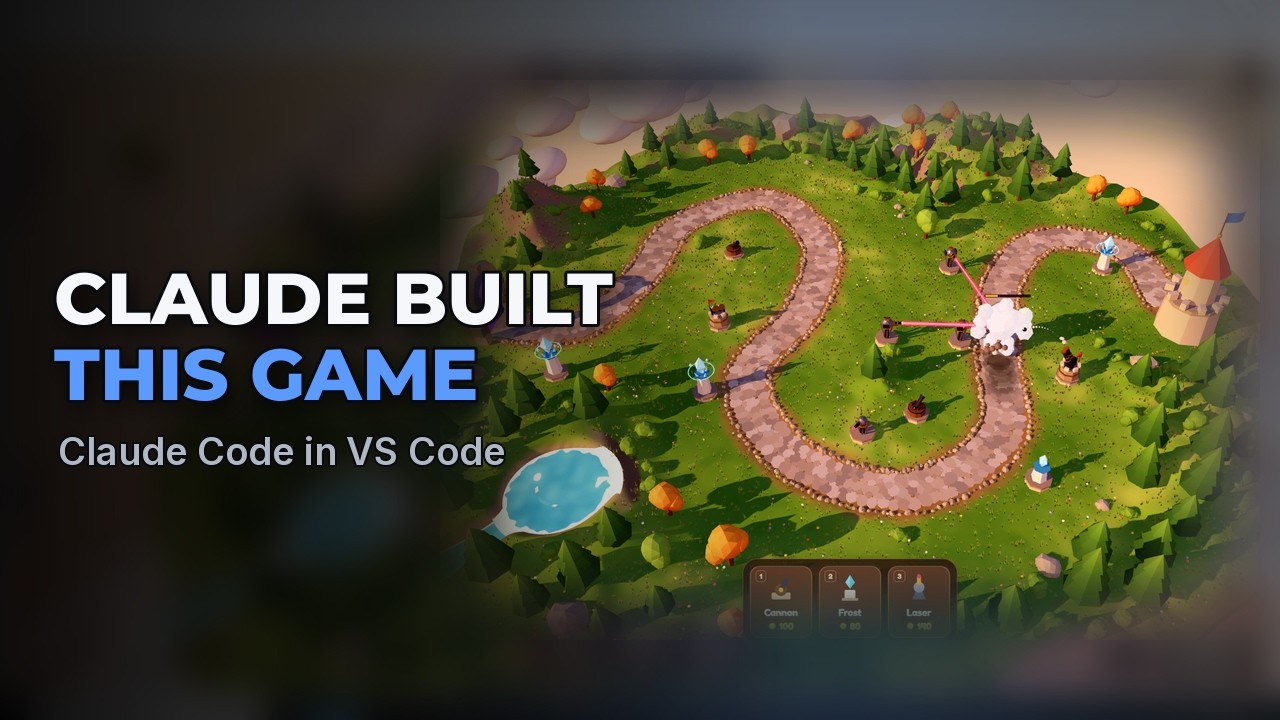
To use Claude Code in VS Code you need a Claude Pro or Max plan; the free plan does not include it. Open Extensions, search for Claude Code and install the one published by Anthropic with the blue check mark. Click the new Claude Code tab, choose Claude.ai Subscription and authorize it in your browser. Then pick a model (Opus for big builds), an effort level and a mode. For a big project start in Plan mode: Claude writes a plan, you comment on it, and after you approve it, Claude builds. In the video this makes Skyhold, a complete 3D tower defense game.
What you need
- VS Code connected to WSL (video 1) and Node.js (video 3)
- A Claude Pro or Max plan (Pro was $20 a month, or $17 a month paid yearly, in October 2026)
The steps
Copilot Free's limits: why go beyond free
GitHub Copilot's free plan has two limits you run into as projects grow: the monthly allowance (every prompt uses some, and when it runs out you wait until next month) and the model (the free plan picks one for you, and the stronger models are marked Upgrade). Bigger projects go better with a stronger model and an agent that can work through a long task on its own. That is Claude Code, made by Anthropic.
Watch this part (0:28) →What Claude Pro and Max cost
Claude's plans are on claude.com under Pricing. The free plan is for chatting and does not include Claude Code. In October 2026, Pro is $20 a month, or $17 a month if you pay for the year; Max starts at $100 a month with 5 or 20 times the usage of Pro. Both include Claude Code. Usage resets every five hours, with a weekly limit on top, and chatting with Claude counts toward the same limits.
Watch this part (1:15) →Install Claude Code in VS Code
Click Extensions on the left and search for Claude Code. There are lookalikes, so pick the one by Anthropic with the blue check mark and click Install. VS Code asks whether you trust the publisher: Anthropic is verified, so click Trust Publisher and Install. Claude Code gets its own tab next to Copilot's chat.
Watch this part (1:49) →Sign in
Click the Claude Code tab, choose Claude.ai Subscription, and click Open when VS Code asks to open a website. In your browser, sign in with the account you subscribed with and click Authorize. Back in VS Code, Claude Code is ready.
Watch this part (2:21) →Models, effort and modes explained
Click the model name at the bottom of the prompt box. Haiku is the fastest, for quick questions and small edits. Sonnet is the efficient everyday choice. Opus is the default, for complex work and bigger builds. Fable is the most capable; it is included with Max and costs extra credits on Pro. The effort setting decides how long Claude thinks: medium for everyday work, high for a whole game. The mode decides what Claude may do without asking: Manual asks before every edit, Edit automatically changes files without asking, Auto (the default) runs anything that passes a safety check and stops for anything risky, and Plan writes a plan first and waits for your OK.
Watch this part (2:52) →Plan mode: plan the game
Paste the first prompt below. Because it is a big build, the prompt covers four things: how the game should look, what you can do, what is in it, and how polished it should feel. In Plan mode Claude doesn't touch a file yet; a few minutes later the plan opens next to the chat and Claude waits for your answer.
Watch this part (4:02) →Review the plan and change it
The plan reads like a game design document, with every tower, enemy and wave laid out with real numbers. To change anything, select the text and add a comment (the second prompt below is the comment from the video).
Watch this part (4:33) →Build the game
Send your feedback and Claude updates the plan. When it looks right, choose Yes and use auto mode, and Claude starts building. You don't have to wait to ask for more: a message sent while Claude works waits in a queue (the third prompt below).
Watch this part (4:57) →Play it
In a terminal, type npm run dev and open the address it shows. Pick a tower, build on the lit tiles and start the first wave. Claude also added test shortcuts for itself so it could check the boss fight without playing all ten waves; add ?debug to the address to use them.
Watch this part (5:27) →The boss fight
On the last wave the golem boss marches out of the portal. When it falls, it breaks into boulders that tumble off the island, exactly as the comment on the plan asked.
Watch this part (6:37) →Install Claude Code in the terminal (CLI)
Claude Code also runs in the terminal, which is handy on a server where there is no VS Code window. Paste the install command below. If the installer says its folder isn't on your PATH, run the PATH command it gives you (once). Then type claude; the first time in a folder it asks whether you trust the files there. It is the same Claude, signed in with the same plan. Shift+Tab switches between the modes.
Watch this part (7:08) →Add a pause menu from the terminal
The fourth prompt below adds a pause menu from the terminal. Back in the game, start a wave and press P: the battle freezes behind a menu styled like the title screen.
Watch this part (8:08) →Is Claude Pro worth it?
While you are learning, Copilot's free plan is plenty. When you run out every month, or your projects get bigger like this one, Claude Pro is the next step.
Watch this part (8:22) →
The exact prompts
Copy them as they are. They are the prompts typed in the video.
Build me a 3D tower defense game in my browser with Three.js and Vite. Set it on a floating island at golden hour, with a winding stone path, grassy hills, rocks, trees and a waterfall pouring off the edge, and make it look like a polished indie game: soft shadows, warm light, crisp and sharp at full screen resolution, with no blurry glow. I build towers on the grass beside the path: a cannon with explosive splash damage, a frost tower that slows enemies, and a laser that locks onto one target, each with its own model and three upgrade levels I can buy. Send ten waves along the path with fast runners, armored tanks, flying drones and a giant boss on the last wave, all with health bars. Add gold for every kill, lives, a wave counter, a start wave button, a speed-up button, satisfying hit and explosion effects, and a sound for every shot and hit.
When the golem dies, make it crumble into boulders that tumble off the edge of the island.
When you're done, add a title screen with the game's name and a Play button.
Add a pause menu. Pressing P or Escape pauses the game and shows Resume, Restart and a sound toggle, styled like the title screen.
Commands typed in the terminal
curl -fsSL https://claude.ai/install.sh | bash
echo 'export PATH="$HOME/.local/bin:$PATH"' | tee -a ~/.bashrc && source ~/.bashrc
claude
npm run dev
Links from the video
Questions people ask
Is Claude Code free?
No. Claude Code comes with Claude Pro and Max; the free Claude plan is for chatting only (October 2026).
Is Claude Pro worth it for coding?
While you are learning, a free plan like GitHub Copilot's is plenty. Pro is worth it when you run out of the free allowance every month or your projects get bigger, like the 3D game in this video (recorded on a Max account). In October 2026 Pro is $20 a month.
How do I install Claude Code in VS Code?
Open Extensions, search for Claude Code, install the one by Anthropic with the blue check mark, click the Claude Code tab, choose Claude.ai Subscription and authorize it in your browser.
Which Claude model should I use?
Haiku for quick questions and small edits, Sonnet for everyday changes (it goes easier on your limits), Opus for complex work and big builds, and Fable for the toughest problems (included with Max, extra credits on Pro).
What is Plan mode in Claude Code?
In Plan mode Claude explores and writes a plan first, then waits for your OK before it changes a file. You can select any part of the plan and comment on it. Start big builds in Plan mode.
How do I install Claude Code in the terminal?
On Linux or WSL, run curl -fsSL https://claude.ai/install.sh | bash, run the PATH command if the installer asks for it, then type claude in your project folder.
Should a beginner use Claude Code or GitHub Copilot?
Start free with Copilot (videos 1 to 4 of this series). Move to Claude Code when the free allowance or the free model holds your projects back.
Can Claude Code build a 3D game?
Yes. Skyhold, the tower defense game from this video, was planned and built by Claude Code and is playable in a browser.
Transcript
Read what is said in the video
0:00 Claude Code in VS Code: what you'll build
In this video, I'll show you how to take your vibe coding further with Claude, what it costs, and what you get for the money. We'll add Claude Code to VS Code, pick the right model, and have Claude plan and build a complete 3D tower defense game, then use Claude in the terminal too. You'll need VS Code connected to Linux, which we set up in an earlier video. The link is in the description.
0:28 Copilot Free's limits: why go beyond free
Copilot Free is a great way to start, but there are two limits you'll run into as your projects get bigger. The first is the monthly allowance. Every prompt uses some of it, and when it runs out, you wait until next month. The second is the model. The free plan picks one for you, and the stronger models, Claude included, are marked Upgrade. Bigger projects go better with a stronger model and an agent that can work through a long task on its own. That's Claude Code. It's a coding agent made by Anthropic, the company behind Claude, and it works right inside VS Code. You could upgrade Copilot instead, but a Claude plan gets you Claude's own agent, and the same plan also covers chatting with Claude on the web and your phone.
1:15 What Claude Pro and Max cost
Claude's plans are on claude.com, under Pricing. The free plan is just for chatting, and it doesn't include Claude Code. Pro is the one to start with. At the time of recording, it's twenty dollars a month, or seventeen if you pay for the year. Max starts at a hundred dollars a month, with five or twenty times the usage of Pro, for when you build all day. Both of them include Claude Code. Your usage resets every five hours, with a weekly limit on top, and chatting with Claude counts toward the same limits.
1:49 Install Claude Code in VS Code
Now we're going to add Claude Code to VS Code. Click Extensions on the left and search for Claude Code. You'll see lots of lookalikes, so pick the one by Anthropic with the blue check mark. Click Install. The first time, VS Code asks whether you trust the publisher. Extensions run on your computer, so only install them from publishers you trust. Anthropic is verified, so click Trust Publisher and Install. When it's done, Claude Code gets its own tab next to Copilot's chat.
2:21 Sign in
Click the Claude Code tab to sign in. Choose Claude.ai Subscription, since that's the plan you just got. VS Code asks before it opens a website, so click Open. Your browser opens on Claude's website. If you're signed in there already, it just asks you to let Claude Code use your account. If you're not, sign in with the account you subscribed with first. Click Authorize. That's it, and you can close the browser. Back in VS Code, Claude Code is ready.
2:52 Models, effort and modes explained
Before a big build, it's worth picking the right model. Click the model name at the bottom of the prompt box. Haiku is the fastest, for quick questions and small edits. Sonnet is the efficient everyday choice for simpler changes, and it goes easier on your limits. Opus is the default, for complex work and bigger builds like this one. And Fable is the most capable, for your toughest challenges. It's included with Max, but on Pro it costs extra credits. The effort setting decides how long Claude thinks. Medium is right for everyday work, and a higher effort thinks harder but uses more of your limits. For a whole game, turn it up to high. Next to the model is the mode, which decides what Claude can do without asking you. Manual asks before every edit. Edit automatically changes files without asking. Auto is the default. It runs anything that passes a safety check and stops for anything risky. And Plan explores and writes a plan first, then waits for your OK before it changes a thing. For a big build like a game, start in Plan.
4:02 Plan mode: plan the game
Now describe the game. Since this is a big build, the prompt covers four things: how it should look, what you can do, what's in it, and how polished it should feel. The more you give it, the closer the first version gets to what you picture. In Plan mode, Claude doesn't touch a file yet. It works out what the game needs and writes the whole design down first. A few minutes later, the plan opens next to the chat, and Claude waits for your answer.
4:33 Review the plan and change it
The plan reads like a game design document. It starts with the look, down to sharp shadows and no blurry glow, then lays out every tower, enemy and wave with real numbers. To change anything, select it and add a comment. Here, when the golem boss dies, it should crumble into boulders that tumble off the island.
4:57 Build the game
Send your feedback, and Claude updates the plan to match. When it looks right, choose Yes and use auto mode, and Claude starts building. You don't have to wait for it to finish to ask for more. A message you send while Claude works waits in a queue until it's ready, so here it's a title screen with a Play button. When it's done, Claude sums up what it built.
5:27 Play it
In a new terminal, type npm run dev, and open the address it shows. There's the title screen we asked for while Claude was working. Click Play. Pick a tower at the bottom, and the tiles you can build on light up. Then start the first wave. Every tower aims and fires on its own, and the enemies get health bars that drop as they take hits. Frost slows them down, cannons hit whole groups, and lasers burn through the toughest ones. The speed button runs the game two or three times as fast. Claude also added test shortcuts for itself, so it could check the boss fight without playing all ten waves. Add question mark debug to the address to use them. Click a tower to see its stats, with what the next upgrade adds. Each upgrade changes how the tower looks too.
6:37 The boss fight
On the last wave, the golem boss marches out of the portal, and every tower turns on it. When it falls, it breaks into boulders that tumble off the island, just like the comment asked.
7:08 Install Claude Code in the terminal (CLI)
Claude Code also runs right in the terminal, which is handy on a server where there's no VS Code window. To install it, open a new terminal and paste the install command from the description. The setup notes say its folder isn't on your path yet. That just means typing claude won't find it, so run the command it gives you, and you'll only need to do this once. Now type claude. The first time you run it in a folder, it asks whether you trust the files there. This is your own project, so choose Yes. It's the same Claude, signed in with the same plan, and it even shows the model and effort you picked in VS Code. Let's add one more feature from here: a pause menu. Claude works through it right in the terminal, editing files and checking its work just like in the panel. In the terminal, Shift Tab switches between the modes, and you can see which one you're in at the bottom.
8:08 Add a pause menu from the terminal
Back in the game, start a wave and press P. There's the pause menu, styled to match the title screen, and the whole battle freezes behind it.
8:22 Is Claude Pro worth it?
So here's when Claude is worth paying for. While you're learning, Copilot Free is plenty. When you run out every month, or your projects get bigger like this one, Claude Pro is the next step, for about the price of a couple of lunches a month. That's all it takes to level up your vibe coding with Claude. You bring the ideas, Claude brings the know-how, and together you can finally build the project you've been dreaming about. Be sure to leave a like and subscribe, so we can keep bringing you more great videos.