
Video 12 of 8 · 9 min · Updated October 18, 2026
Chat with a PDF offline: an AI in the free Acrobat clone with llama.cpp (8 GB GPU)
To chat with a PDF without sending it anywhere, run an AI model on your own graphics card with llama.cpp's server and give the whole document to it in one go. On an 8 GB card the normal memory holds about 32,000 tokens, under half of a 57-page guide; the buun fork of llama.cpp stores the model's working memory (the KV cache) about four times smaller, so the whole guide fits. In the video a free AI agent, GitHub Copilot, adds an Ask this PDF panel to PdfCraft, the open-source Acrobat clone, and every answer names its page.
What you need
- Windows with an NVIDIA graphics card (8 GB or more recommended) and Ubuntu on Windows (video 1)
- VS Code with GitHub Copilot's free plan (video 1)
- About 10 GB of free disk space for the tools and the model
The steps
Get the real PdfCraft
Search GitHub for PdfCraft and you find many copies named like "Download PdfCraft": avoid them, fake download pages are a common way to spread malware. The real one is storytold/pdfcraft. Fork it to your own account under a new name (its brand license asks a changed copy to drop the ArtCraft name), install Rust with one winget command, restart VS Code, clone your fork and build it with cargo run.
Watch this part (0:55) →Why llama.cpp this time
Ollama is the easy way to run a local model; llama.cpp gives you every setting, runs any model file from Hugging Face and has a server any app can talk to. The buun fork adds Google's TurboQuant idea: the model's working memory for your document, the KV cache, about four times smaller.
Watch this part (2:09) →Build buun
In an Ubuntu terminal, go to your home folder, clone buun and set up the build for your card (61 for a GTX 10-series). With CUDA 12 on a new Ubuntu you get an error about cospi: patch the six lines of CUDA's header with the command below, delete the build folder and run the setup again. The build takes about eight minutes.
Watch this part (2:47) →The model and the server
Download Ornith 9B, a 5.6 GB model file that fits an 8 GB card, and start llama-server with the whole model on the GPU, the turbo4 cache and thinking off. Open localhost:8080 for its own chat page: about 30 tokens a second, the same speed as Ollama.
Watch this part (4:00) →How much fits
Start the server with the normal f16 memory and no size, and llama.cpp fits the context to your card: about 32,000 tokens here. With turbo4 it's about 116,000, three and a half times as much, and turbo3_tcq about 143,000. On an older card the answers come more slowly at full length; reading speed per token stays the same.
Watch this part (4:51) →Copilot adds "Ask this PDF"
Back in PdfCraft's folder, open Copilot's chat in Agent mode and describe the panel (the prompt is below). Two lines matter: the document first and the question last, so llama.cpp can reuse the document for the next question, and a 30-minute wait, because a long PDF takes minutes to read the first time. When Copilot asks whether to continue, click Continue.
Watch this part (5:48) →Ask the PDF
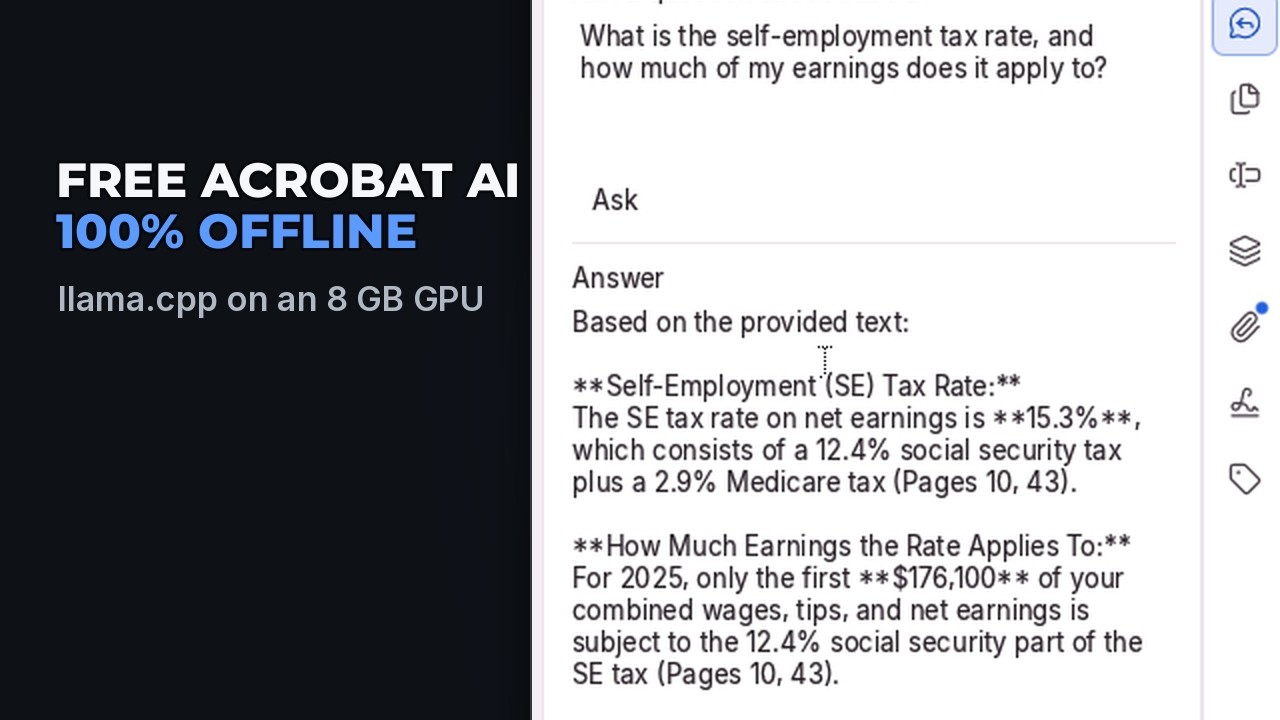
With the normal memory the panel shows the server's answer: the 57-page guide is about 72,000 tokens and doesn't fit. With turbo4 the first question reads all 57 pages in about five minutes and the answer names page 10; a follow-up takes about a minute, because the document stays in memory.
Watch this part (6:56) →Free on GitHub
A second prompt renames the copy AskThisPDF, removes the ArtCraft logos and links as their license asks, and credits PdfCraft. Commit and push, and it's on GitHub, free for anyone.
Watch this part (7:49) →
Follow along
Every prompt and command from the video, in order. Prompts go to the AI as they are; commands go in the terminal.
winget install Rustlang.Rustup
git clone https://github.com/<your-account>/askthispdf
cd askthispdf
code -r .
curl.exe -o p334.pdf https://www.irs.gov/pub/irs-pdf/p334.pdf
cargo run --release -p pdfcraft -- p334.pdf
wget https://developer.download.nvidia.com/compute/cuda/repos/wsl-ubuntu/x86_64/cuda-keyring_1.1-1_all.deb
sudo dpkg -i cuda-keyring_1.1-1_all.deb
sudo apt update
sudo apt install -y cuda-toolkit-12-9 g++-14 cmake
echo 'export PATH=/usr/local/cuda/bin:$PATH' | tee -a ~/.bashrc
source ~/.bashrc
cd ~
git clone --depth 1 https://github.com/spiritbuun/buun-llama-cpp
cd buun-llama-cpp
cmake -B build -DGGML_CUDA=ON -DGGML_CUDA_FA=ON -DGGML_CUDA_FA_QUANTS=all -DCMAKE_CUDA_ARCHITECTURES=61 -DCMAKE_CUDA_HOST_COMPILER=g++-14
sudo sed -i -E 's/^(extern __DEVICE_FUNCTIONS_DECL__ __device_builtin__ (double|float) +(sinpi|sinpif|cospi|cospif|rsqrt|rsqrtf)\((double|float) x\));/\1 noexcept (true);/' /usr/local/cuda-12.9/targets/x86_64-linux/include/crt/math_functions.h
rm -rf build
cmake -B build -DGGML_CUDA=ON -DGGML_CUDA_FA=ON -DGGML_CUDA_FA_QUANTS=all -DCMAKE_CUDA_ARCHITECTURES=61 -DCMAKE_CUDA_HOST_COMPILER=g++-14
cmake --build build -j 16 --target llama-server
wget -P ~/models https://huggingface.co/ornith-ai/Ornith-1.0-9B-GGUF/resolve/main/ornith-1.0-9b-Q4_K_M.gguf
build/bin/llama-server -m ~/models/ornith-1.0-9b-Q4_K_M.gguf -ngl 99 -fa on -ctk turbo4 -ctv turbo4 --reasoning-budget 0
build/bin/llama-server -m ~/models/ornith-1.0-9b-Q4_K_M.gguf -ngl 99 -fa on -ctk f16 -ctv f16 --reasoning-budget 0
build/bin/llama-server -m ~/models/ornith-1.0-9b-Q4_K_M.gguf -ngl 99 -fa on -ctk turbo3_tcq -ctv turbo3_tcq --reasoning-budget 0
Add an "Ask this PDF" panel to this PDF app. Put it in the right-hand Inspector, next to Bookmarks, with its own button in the strip on the right. It has a box for my question, an Ask button, and the answer below. When I press Ask, take the open document's text page by page, start each page with "=== Page N ===", and send it to the AI running on my PC: llama.cpp's server at http://localhost:8080/v1/chat/completions (OpenAI-style, no key). Put the document first and my question last, so the server can reuse the document for my next question. Tell the AI to answer only from the document and to put the page after each fact, like (page 12). A long PDF can take 15 minutes to read the first time, so wait up to 30 minutes, in the background so the app never freezes. If the server is off or says the document is too long, show its message in the panel. Keep it small: copy how the Bookmarks panel is built and use the engine's existing text extraction. Finish by building it with cargo build --release -p pdfcraft, fix any errors, and don't stop until that build has passed.
cargo run --release -p pdfcraft -- p334.pdf
This copy is now called AskThisPDF. Rename it everywhere people see the name: the window title, the start page, the About box and the Help menu. Remove the ArtCraft logos, the ArtCraft Discord and website links, and the docs/brand folder, as docs/brand/LICENSE-brand.txt asks of a modified copy, and say in plain text in the About box and at the top of the README that it is based on PdfCraft by the ArtCraft team. Keep the license files and the app icon. Don't rename crates, folders or code. Finish by building it with cargo build --release -p pdfcraft, fix any errors, and don't stop until that build has passed.
git add -A
git commit -m "Ask this PDF panel with llama.cpp, renamed AskThisPDF"
git push
Troubleshooting
The errors we hit making this video, word for word, and how each one was fixed.
Ubuntu's CUDA package wants to install a Linux GPU driver
The following NEW packages will be installed: ... libnvidia-compute-595 nvidia-kernel-common-595 ...
Why: In WSL, Windows' own NVIDIA driver runs the GPU. Ubuntu's nvidia-cuda-toolkit package brings a Linux driver library with it, and NVIDIA's guide says never to install one inside WSL. Ubuntu 26.04's newer cuda-toolkit-13 doesn't support GTX 10-series cards at all.
Fix: Answer n, then install CUDA 12.9 from NVIDIA's WSL repository, which has no driver in it.
wget https://developer.download.nvidia.com/compute/cuda/repos/wsl-ubuntu/x86_64/cuda-keyring_1.1-1_all.deb
sudo dpkg -i cuda-keyring_1.1-1_all.deb
sudo apt update
sudo apt install -y cuda-toolkit-12-9 g++-14 cmake
exception specification is incompatible with that of previous function "cospi"
/usr/include/x86_64-linux-gnu/bits/mathcalls.h(83): error: exception specification is incompatible with that of previous function "cospi"
6 errors detected in the compilation of "CMakeCUDACompilerId.cu".
-- Configuring incomplete, errors occurred!
Why: New Ubuntu versions (glibc 2.41 and later) declare cospi, sinpi and rsqrt themselves, and CUDA 12's header declares the same six functions a little differently. CUDA 13 fixed it, but CUDA 13 can't build for GTX 10-series cards.
Fix: Patch the six lines in CUDA's header (it keeps a backup), delete the build folder and run cmake again.
sudo sed -i.orig -E 's/^(extern __DEVICE_FUNCTIONS_DECL__ __device_builtin__ (double|float) +(sinpi|sinpif|cospi|cospif|rsqrt|rsqrtf)\((double|float) x\));/\1 noexcept (true);/' /usr/local/cuda-12.9/targets/x86_64-linux/include/crt/math_functions.h
rm -rf build
A bigger context loads with no error, then part of it sits in your PC's RAM
(no error: the server starts, and Task Manager shows the GPU's own memory full and Shared GPU memory in use)
Why: NVIDIA's Windows driver lets the GPU borrow your PC's RAM when its own memory is full, instead of refusing. The model still runs, but whatever spilled over is slower to reach, and with a compressed cache it can still run out of memory late in a long read.
Fix: Leave -c out and let llama.cpp size the context to your card (it keeps 1 GB spare; --fit-target 256 keeps 256 MB). Or switch the spill off in NVIDIA Control Panel: Manage 3D settings, CUDA - Sysmem Fallback Policy, Prefer No Sysmem Fallback.
CUDA error: out of memory partway through reading a long PDF
CUDA error: out of memory; device=0; function=ggml_backend_cuda_vmm_pool_map; source=.../ggml/src/ggml-cuda/vbr-vmm.cu:169
Why: On a card without tensor cores (GTX 10-series), buun reads the compressed cache through a scratch buffer that grows as the context fills. llama.cpp's fit counts the cache, not that buffer, so with only 256 MB spare it runs out late in a long read.
Fix: Keep llama.cpp's default 1 GB spare: leave -c and --fit-target out and let it size the context.
Copilot stops and asks "Continue to iterate?"
Continue to iterate? Copilot has been working on this problem for a while. It can continue to iterate, or you can send a new message to refine your prompt.
Why: Copilot caps how many requests one prompt may make, and a big project goes past it.
Fix: Click Continue: the same run carries on with the same prompt. To raise the cap, click Configure max requests in that message.
Links from the video
Questions people ask
How do I chat with a PDF offline?
Run a local model with llama.cpp's server on your own computer and send it the PDF's text with your question. In the video an Ask this PDF panel in PdfCraft does that for you, and nothing leaves your PC.
Is there a free alternative to Acrobat's AI Assistant?
Yes: AskThisPDF, the copy of the open-source PdfCraft built in this video, answers questions about a PDF with a model running on your own graphics card. It's free on GitHub.
How much of a PDF fits on an 8 GB graphics card?
With a 9B model and the normal f16 cache, about 32,000 tokens, roughly 20 to 25 dense pages. With buun's turbo4 cache about 116,000 tokens, which held a whole 57-page IRS guide.
What does turbo4 do?
It stores the model's working memory for your document, the KV cache, in about 4 bits instead of 16, so about four times as much text fits in the same graphics memory, with almost no change to the answers.
Why does a follow-up question answer faster?
llama.cpp keeps the part of the prompt that didn't change. With the document first and the question last, a new question only needs the new words read.
Is the PdfCraft download safe?
Use only the official repository, storytold/pdfcraft. GitHub has many lookalike copies with names like "Download PdfCraft"; avoid them.
Transcript
Read what is said in the video
0:00 Intro
Vibe coders just rebuilt Adobe's apps as free, open-source clones, and one of them is a full PDF editor like Acrobat. What it doesn't have is AI, and Adobe charges at least ten dollars a month for theirs. In this video, I'll show you how to add an AI to it that runs on your own graphics card, reads a whole fifty-seven page PDF at once, and answers with the page it found it on. Nothing you open ever leaves your computer. We'll use PdfCraft, the open-source Acrobat clone, then llama.cpp to run the AI model, in a version that fits far more of your document on an eight gigabyte card, and GitHub Copilot's free plan to build the feature for us. You'll need VS Code with Copilot and Ubuntu on Windows, which we set up in our first video. The link is in the description.
0:55 Get the real PdfCraft
Search GitHub for PdfCraft and you'll find lots of copies with names like "Download PdfCraft". Stay away from those, because fake download pages are a common way to spread malware. The real one is storytold slash pdfcraft. It's linked from the ArtCraft website and has over fifteen thousand stars. Click Fork to make your own copy on your GitHub account. We'll name ours AskThisPDF, because their license asks a changed copy to drop the ArtCraft name and logo. PdfCraft is written in Rust, so in a terminal in VS Code, install Rust with this one command. Close VS Code and open it again so it picks up Rust. Then clone your copy, go into its folder, and open it in VS Code. We'll test with the IRS tax guide for small businesses, a free government PDF, and this downloads it. This command builds PdfCraft and opens the guide in it. The first build takes about eight minutes, because it compiles everything from scratch. And here it is. Editing, signing, forms and more, all free.
2:09 Why llama.cpp this time
In video eight we ran a local model with Ollama, which is the easy way. This time we're using llama.cpp, because it puts every setting in your hands, runs any model file from Hugging Face, and comes with a server that any app can talk to. And we're using a version of it called buun. It's a fork, which means someone copied the project and added their own changes. buun adds Google's TurboQuant idea, which stores the model's working memory for your document, called the KV cache, about four times smaller. On an eight gigabyte card, that's the difference between part of a PDF and all of
2:47 Build buun
it. Open a new terminal, pick Ubuntu, and go to your home folder, because this part builds on Linux. You'll need NVIDIA's CUDA toolkit, and the commands to install it are on the video's page, linked in the description. If your card is from the GTX ten series like this one, use version twelve point nine, because the newest version no longer supports these cards. Clone buun and go into its folder. This command sets up the build for your card. The last two settings are your card's generation, sixty-one for the ten series, and a compiler version that CUDA twelve accepts. And here's an error you'll hit on a new version of Ubuntu: exception specification is incompatible with that of previous function cospi. Ubuntu's newer system library and CUDA twelve both describe the same six math functions, slightly differently. The fix is one command that updates those six lines in CUDA's file. It's on the video's page, so you can copy it. Then delete the build folder and run the setup again. This time it works, so build it. It takes about eight minutes.
4:00 The model and the server
For the model, we're using Ornith nine B, the same one as video eight, so we can compare them. Its files come in different sizes, and the Q four K M file is five point six gigabytes, which fits an eight gigabyte card. This downloads it into a models folder. Now start the server. These settings put the whole model on the graphics card, turn on buun's turbo four memory, and switch off the model's thinking step, so answers come straight away. llama.cpp has its own chat page, so open localhost colon eight zero eight zero in your browser and ask it something. It writes about thirty tokens a second, the same as Ollama did in video eight. So speed isn't the reason to switch. Memory is.
4:51 How much fits
Let's see how much fits. buun picks its compressed memory by itself, so to compare, start the server with the normal memory, called f16, and no size. llama.cpp then works out the biggest context your card can hold. Here that's about thirty-two thousand tokens, not even half of our fifty-seven page guide. Task Manager shows the card nearly full. Now the same model with turbo four. That's about a hundred and sixteen thousand tokens, three and a half times as much, enough for the whole guide with room to spare. Turbo three goes further, to about a hundred and forty-three thousand. There's a cost on an older card like this one. Reading takes the same time per page, but at full length the answers come more slowly. For a whole document in one go, that's a good trade.
5:48 Copilot adds "Ask this PDF"
Back in PdfCraft's folder, open Copilot's chat in Agent mode and describe the feature. Two lines in this prompt matter more than the rest. The document goes first and the question last, so llama.cpp can reuse the document for the next question. And it waits up to thirty minutes, because a long PDF takes a while to read the first time. Copilot starts by reading how the Bookmarks panel and the text extraction already work, and the project's own notes for AI agents, before it changes anything. Then it adds the panel, its button and the background request, and builds it in release mode, which takes a few minutes each time on a project this size. After about twelve minutes, with the build passing, it asks whether to keep going. Click Continue, and it carries on with the same request: it gives the button its own icon and builds once more. About twenty minutes in all, and the release build passes. Copilot didn't test it against a running server, so that's our next step.
6:56 Ask the PDF
First, with the normal memory. Open the new panel, ask a question, and the server answers that the document is about seventy-two thousand tokens, while it only holds thirty-two thousand. Restart the server with turbo four and ask again. The first question reads all fifty-seven pages, which takes about five minutes on this card. The answer gives the self-employment tax rate, fifteen point three percent, and says where it found it, page ten. Go to page ten, and there it is. Now a follow-up question. This one answers in about a minute, because llama.cpp kept the whole document in memory, and it quotes pages seven and ten word for word.
7:49 Free on GitHub
One more prompt renames it AskThisPDF, takes out the ArtCraft logos and links as their license asks, and credits PdfCraft in the About box and the README. This one runs about forty minutes, because the name is in every translation of the app, and Copilot asks twice whether to continue. The two prompts together used about a quarter of Copilot Free's monthly credits. Commit, push, and it's on GitHub, free for anyone. The first time you push, Git asks you to sign in to GitHub in your browser, just once. The README starts with the credit to PdfCraft, and the link is in the description.
8:41 Wrap up
That's all it takes to add a private AI to a free PDF editor: llama.cpp on your own graphics card, buun to fit the whole document, and a free AI agent to build the feature. You bring the ideas, the agent brings the know-how, and together you can finally build the project you've been dreaming about. Be sure to leave a like and subscribe, so we can keep bringing you more great videos.